Which product actually makes money?
Costs live in a spreadsheet, stock in a supplier’s message, sales in Shopify. You only see per-product profit and empty stock when it’s too late.
Product and operations management for Shopify sellers
Edit your Shopify products in Rota, link each product to its supplier and cost, and see stock and profit in the same place. Suppliers prepare the order and enter the tracking number, Rota writes it to Shopify, and your customer follows the order on a page in your brand.
Four problems sellers working with several stores and suppliers face every day:
Which product actually makes money?
Costs live in a spreadsheet, stock in a supplier’s message, sales in Shopify. You only see per-product profit and empty stock when it’s too late.
I enter tracking numbers one by one
Numbers arrive by chat, email and spreadsheet. Typing them all into Shopify takes hours and invites mistakes.
Every store in its own tab
Each store means another admin and another sheet. Nobody can see at a glance which order is at which stage.
Where is my order?
Supplier tracking numbers often don’t show up on public tracking sites. Customers are left guessing and your inbox fills with the same question.
Rota connects every step from a product entering your catalog to the order reaching your customer. Everyone sees and does only their own part.
Edit Shopify products in Rota; link each SKU to its supplier and cost, and see stock, purchasing and profit in one place.
Invited suppliers see only the orders assigned to them and work with pick lists, packing slips and barcode shipping. No Shopify staff account needed.
Multiple stores, role-based access, bulk actions and an activity log. Your customers follow their order on a tracking page in your brand.
Edit titles, descriptions, SEO, prices, stock and images in Rota; changes are written straight to your Shopify product. Enter each variant’s cost and see the margin right away.
Invite your supplier by email and map products by SKU or variant. Suppliers prepare orders and enter tracking numbers in their own panel; stock, purchasing and settlements are kept in the same place.
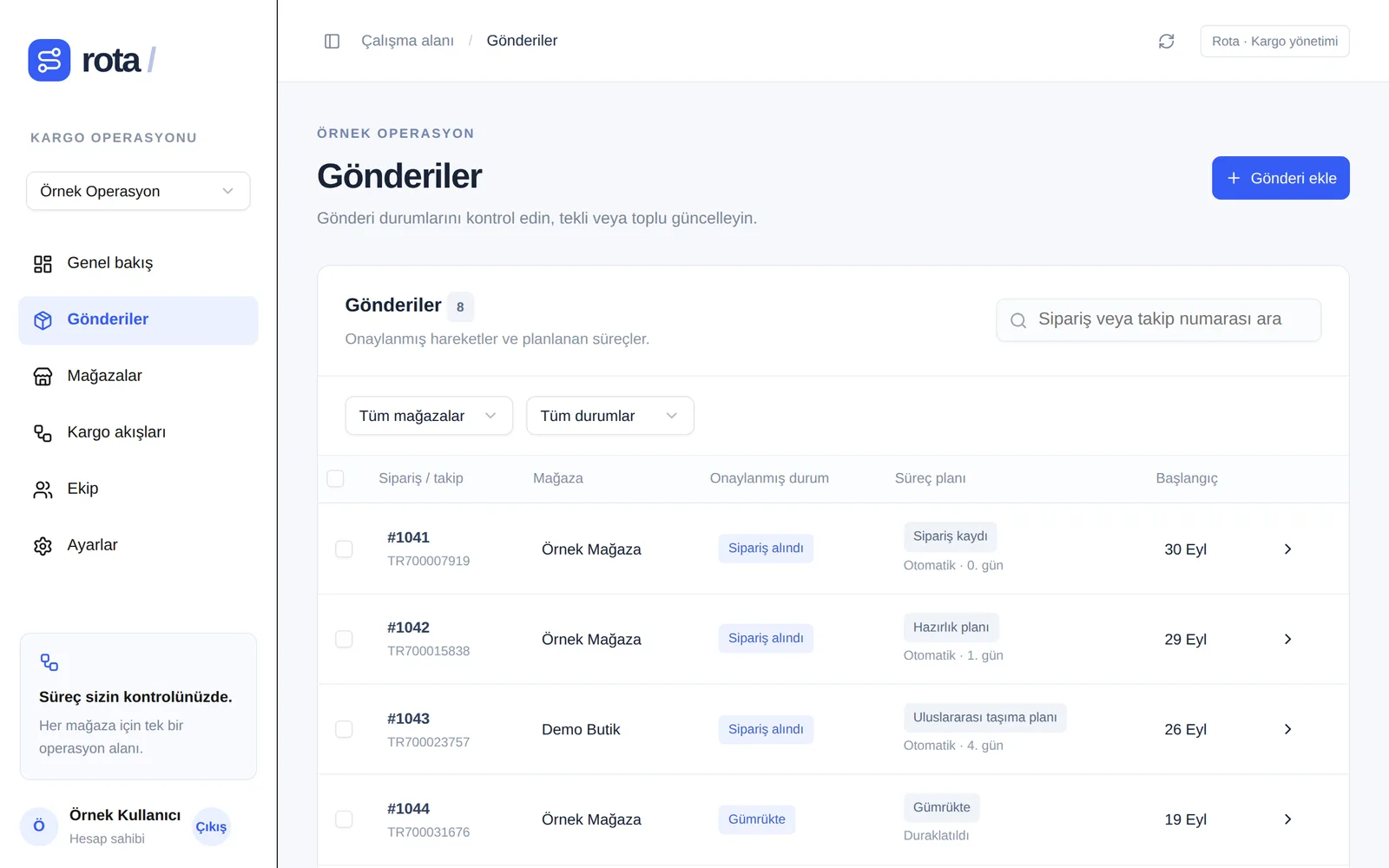
Each store keeps its own flow and brand colour in the same panel. Search by order or tracking number and update the shipments you select in one click.
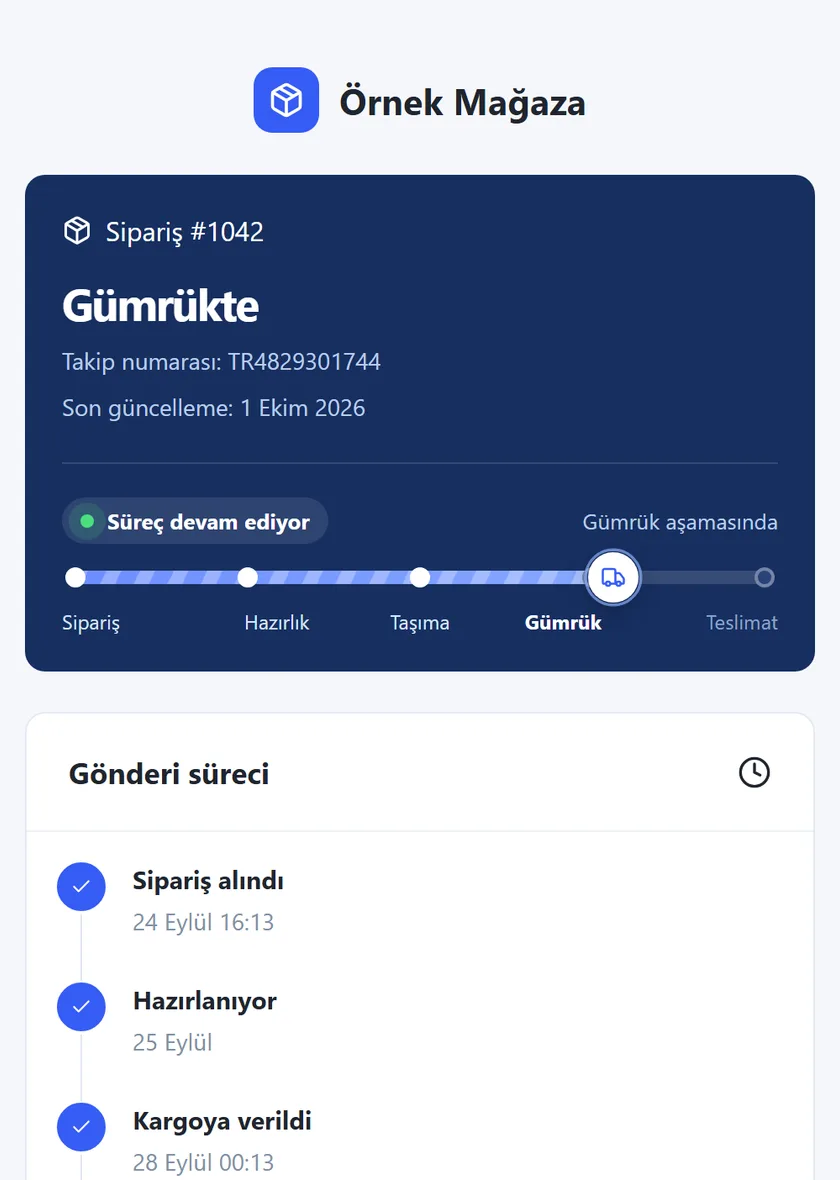
Every order gets a tracking page in your brand colour. Customers find their order from the link or from the lookup page on your store, using the tracking number or order number + email.
Rota calculates a process plan from the days you set; every step you confirm in the panel replaces the plan. The shipped date is the moment the tracking number is added. Future dates are shown to customers as “estimated”; on Premium and higher you can let the steps after shipping follow the carrier’s own data.
After setup, product, supplier and shipment work runs from one screen.
Sign in with Google, create a workspace for your business and invite your team.
Install Rota from Shopify, map your products to suppliers and costs, and invite suppliers by email.
Suppliers prepare orders and enter tracking numbers, Shopify is updated, stock and profit stay current, and customers follow the process.
About the Shopify connection: You can install Rota on your store from the Shopify App Store. The Shopify connection covers order import, writing tracking numbers to Shopify and the in-store tracking page. For stores that install from Shopify, charges are billed through your Shopify invoice. Questions? Email us.
Choose your plan by number of stores and your tracking quota by monthly order volume. Two months free with yearly billing.
For trying out and low volume
$0
For growing brands
$19 / mo
or $190 / year
For multi-store operations
$49 / mo
or $490 / year
For high-volume teams
$129 / mo
or $1,290 / year
A busy month? Buy a one-time pack. Credits never expire and are only used once your monthly quota runs out.
Tracking quota: 1 is deducted the first time an order’s customer tracking page is opened; the same order is never counted again, however often it’s opened. The quota resets on the 1st of every month. Real carrier data (Track123) is counted separately: 500 shipments a month on Premium, 2,500 on Ultimate; when it runs out, new shipments show the planned timeline, or you can buy an extra carrier data pack of 1,000 shipments ($49). AI is included in every paid plan at no extra charge; the number of actions per month depends on the plan. All quotas are per account (workspace): your stores share the same quota. Prices are in USD; payments are processed by Stripe, or through your Shopify invoice if you installed Rota from Shopify. Change or cancel your plan and tracking quota from the panel at any time.
By signing up for or using Rota you agree to the Terms of use and Privacy policy (in Turkish). Rota is a software tool only; the business using it is responsible for the information shown on its tracking pages and for any consequences of misusing the service.
The monthly tracking number in your plan is the number of orders whose customer tracking page can be opened. 1 is deducted the first time an order’s tracking page (private link, in-store lookup or Rota lookup page) is opened. The same order is never counted again, however often it is opened later. Work your team does in the panel doesn’t affect the quota.
Your extra tracking credits are used first. Without credits, until the quota resets the tracking page of new orders asks the customer to contact your store; orders that were already opened stay visible. You’ll see a warning in the panel at 80% and can upgrade your quota in one click.
A quota upgrade is added to your subscription and renews every month; it’s for steady volume. An extra pack is a one-time payment, its credits never expire and are only used when the monthly quota runs out; it’s for temporary peaks such as campaigns.
Every shipment has an order date. Preparation counts from this date; the “Shipped” step is the moment the tracking number is added, and without one the shipment stays in preparation. Each stage counts from the previous one; you can turn off preparation and customs and add extra stages. This calculation is a plan, not a movement received from a carrier.
No. When the plan reaches its last stage, the shipment shows as “awaiting delivery confirmation”. “Delivered” is only set when an authorised person confirms it in the panel.
Add your supplier in the Suppliers section and invite their email address. The supplier signs in from the invitation link by setting a password or with Google, and sees only the orders assigned to them.
Yes. Changes in the product editor (title, description, SEO, price, cost, Shopify stock, images) are written straight to your Shopify product. Supplier stock, shelf locations and purchase orders are kept in Rota and are not pushed to Shopify stock automatically.
No. “Write with AI” in the product editor only makes suggestions: it uses the product’s current title, description and details and is told not to invent facts. You add the suggestion to the form, check it and save it yourself. With “AI command” in the product list you can give one command for up to 50 selected products (e.g. “shorten the descriptions”, “add a tag”); you see a plan and a preview first and only the changes you approve are written. Paid plans include up to 300 suggestions a day.
Install Rota from the Shopify App Store; the app opens inside your Shopify admin and no separate account is needed. If you get stuck, email us.
On Premium and above you can turn on real carrier data in the store settings: after shipping, the steps (in transit, customs, out for delivery, delivered) follow movements received through our carrier data provider Track123, and carrier updates and the last location can be shown. The number of shipments with carrier data has its own monthly quota (Premium 500, Ultimate 2,500); when it runs out, new shipments show the planned timeline. Dropshipping mode hides Chinese addresses and text. For orders without carrier data, and on other plans, the steps are the statuses you confirm in the panel and the plan calculated from your flow settings.
Change your plan and tracking quota from the “Plan” section in the panel; the difference is invoiced right away. Invoices, card changes and cancellation are handled in the Stripe customer portal; cancellation takes effect at the end of the period.
Start with the free plan: add your store, create your first shipment and see your customer tracking page right away. Questions? info@justrota.com.